
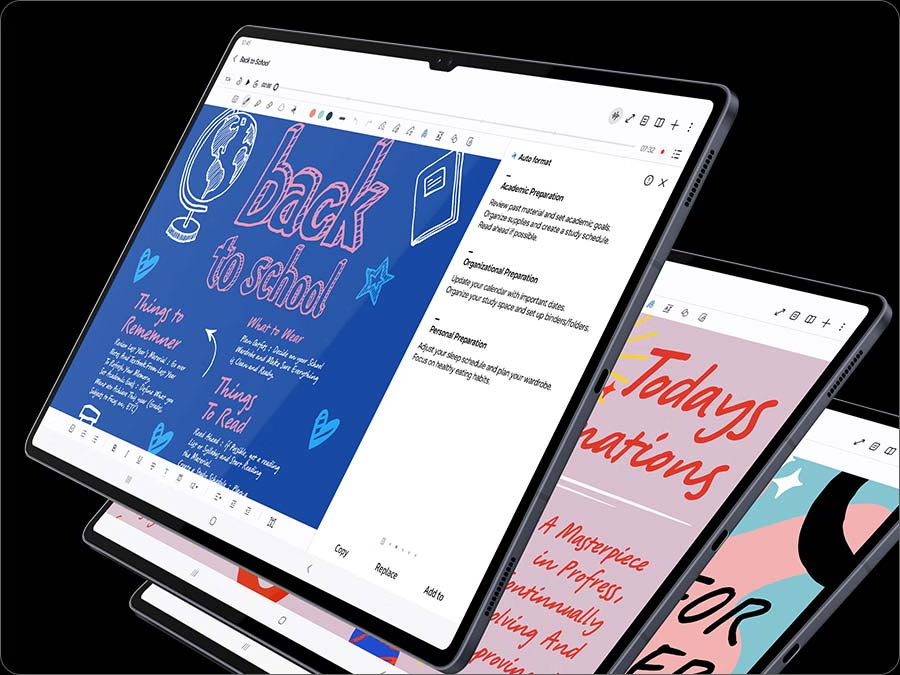
Samsung Galaxy Tab S10 Plus: Is It Worth the Hype?
If you’ve been hunting for a premium tablet that can handle your workday, creative side projects, and late-night binge sessions without breaking a sweat, the Samsung Galaxy Tab S10 Plus deserves a spot on your radar. It’s thin, fast, and surprisingly capable as a laptop alternative.
Here is a closer look at what makes this tablet worth talking about.
Samsung Galaxy Tab S10 Plus: A Display That Makes Everything Look Good
The first thing you’ll notice picking it up is the 12.4-inch Dynamic AMOLED 2X screen. With a 120Hz refresh rate, scrolling feels silky smooth, and colors look vibrant whether you are tweaking photos, watching movies, or sketching out ideas.
Samsung also added an anti-reflective coating that actually works. You won’t have to squint past your own reflection when working near a bright window or outside. Plus, with an IP68 rating and a slim aluminum body, it’s built to handle everyday bumps and the occasional accidental spill.
Samsung Galaxy Tab S10 Plus: Performance Meets Practical AI
Under the hood, the Tab S10 Plus runs on a high-end MediaTek Dimensity 9300+ processor paired with 12GB of RAM. In plain English? It breezes through heavy multitasking, editing apps, and gaming without warming up or slowing down.
Where it really gets interesting is the Galaxy AI features:
- Note Assist: Messy handwriting? It auto-cleans your scribbles, transcribes voice recordings, and summarizes long documents in seconds.
- Sketch to Image: Draw a quick, rough doodle with the included S Pen, and AI turns it into polished artwork.
- Circle to Search: See something you like in a video or photo? Just draw a circle around it with your finger or pen to search for it instantly.
Battery Life and Desktop Flexibility
A great tablet is useless if it’s constantly attached to a wall outlet. Fortunately, the massive 10,090 mAh battery easily lasts through a full day of heavy use, and 45W fast charging gets you powered back up quickly.
When it’s time to get serious work done, switching on Samsung DeX mode shifts the layout into a traditional desktop interface. Snap on a keyboard cover, plug in a mouse, and you have a lightweight setup ready to run multiple floating windows.
The Bottom Line
The Galaxy Tab S10 Plus isn’t just another screen for scrolling social media—it’s a powerful productivity tool. If you want top-tier performance, a killer display, and smart software features that actually save you time, this one is tough to beat.

[…] Samsung Galaxy S26 Ultra is a premium flagship smartphone designed for users who want powerful performance, advanced photography, and […]